22 February 2019
New support portal improves visibility
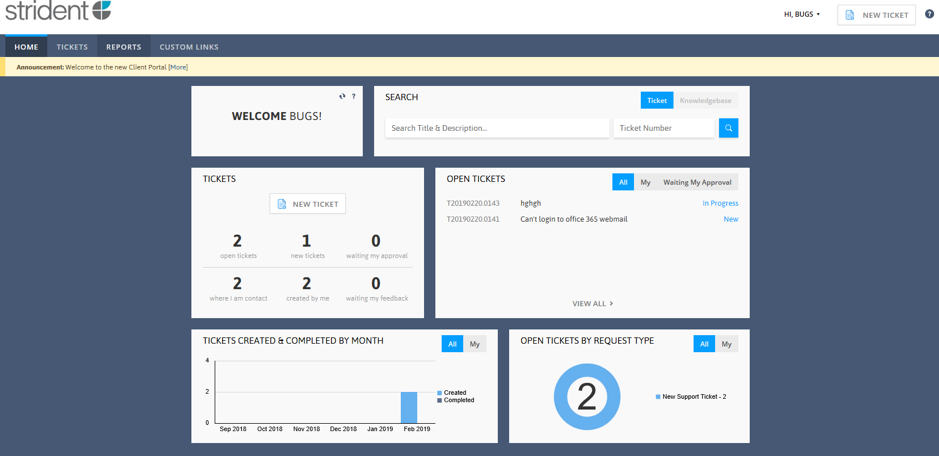
Our new Support Portal enables you to add and track support tickets easily. You can create a ticket, view open and completed tickets, monitor the progress of a ticket and see which engineer it has been assigned to. You can only see tickets that you have created, however, we can enable a manager to view all company tickets if required.
"The Support Portal gives customers even greater freedom and control, allowing them to add tickets out of hours or when calling is not convenient. We've had very positive feedback but we will, of course, be keeping our support phone lines open too. This is just another tool for customers to use," explains Chris Joberns, managing director.
Request username and password
The portal is accessed at www.strident.co.uk/portal/ or you can use the button in the navigation menu above. To request a username and password from the Strident Helpdesk, send an email to helpdesk@strident.co.uk or call on 01473 835281. An email will be sent direct to your email address this will also be your username to login.
Create a Ticket
Log into the portal with your username and password to create a ticket;
- Click on the new ticket button in the top right-hand corner or in the middle of the screen.
- Select the request type then click continue.
- Give the ticket a title with the support problem your having, e.g. "Can't login to Office 365 Portal"
- Give the ticket a description e.g. "Can't access the portal, I have rebooted the PC."
- Then save the ticket.